Dynamical workflows#
Here we provide the language in which TaskBlaster thinks about dynamical workflows. For a hands on introduction see the If, while and branching.
Static workflows#
As static workflows are a building block of dynamical workflows, let’s first discuss the static workflows introduced in the previous section using a more general language. For a static workflow, the tasks will be generated immediately and the dependency graph will be a directed acyclic graph (DAG). When running the static workflow with multiple workers one obtains parallelism where available. However, besides slight parallelization advantage, for most parts, a static workflow building block is to be considered as a sequential non-branching list of instructions of what to calculate.
To give an example of the picture painted above, consider following computer program
a = A()
b = B(param_A=a)
c = C(param_A=a)
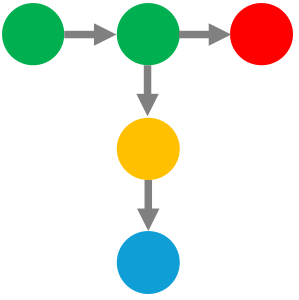
A directed acyclic graph (DAG) can be made on the dependencies of these lines, and we end up with a following relationship between the tasks.
Note, that after completion of taskA, one can parallely execute
taskB and taskC, so, to that end, TaskBlaster will supersede linear
execution of “workflow”-code. Even so, in the end, everything will appear as
it would have been executed linearly, since there is no branching, and no
other dynamics. Before we take a deeper look on how to make our
workflows dynamic, let’s learn about a few more terms.
Branching#
In TaskBlaster, branching allows workflows to dynamically decide the next steps based on the results of previous tasks. This is essential for creating flexible and adaptive workflows that can handle various scenarios.
To define a branch in TaskBlaster, use the @tb.branch decorator. This decorator
assigns a task to a specific branch. If the decorator is omitted, the task will
be assigned to the default branch, entry.
Note
@tb.branch (and all other decorator) must always be above the @tb.task decorator.
For example, one can define a workflow with two branches, even and odd,
@tb.branch('even')
@tb.task
def taskA(self):
   ...

@tb.branch('odd')
@tb.task
def taskB(self):
   ...
Conditional branching#
In some cases, the branching decision is based on the results of a task.
To define a conditional branch, use the @tb._if decorator with a condition
function. The condition function should return a boolean value based on the
results of the task.
@tb._if(true='target', false='other_branch')
@tb.task
def taskC(self):
   ...
In this example, if taskC evaluates to True, the workflow will follow the
target branch. If it evaluates to False, it will follow the other_branch.
Jumping to a branch#
You can also use the @tb.jump decorator to explicitly jump to a different
branch.
@tb.jump('target')
@tb.task
def taskD(self):
    ...
In this example, the workflow will jump to the branch target immediately
(even before it has executed taskD).
Note
jump statements are often useful, after diverging the control from with
if statement, one can converge from the diverged controlflow by jumping to a
common branch.
Using Phi for Dynamic Input Parameter Selection#
The Phi operator is used inside the tb.node definition to select the correct variable
to use, depending from which branch we have jumped from to the current branch.
In other words, consider the following example. We enter the branch C and
hence create the task mytask. Depending whether we came to branch C
from branch A or branch B we will create the task mytask
with input_parameter set to either to self.valueA or self.valueB
respectively.
@tb.branch('C')
@tb.task
def mytask(self):
    return tb.node('mytask', input_parameter=self.Phi(A=self.valueA, B=self.valueB))
It provides a mechanism to reference data before it exists and resolve these inputs once the task has been completed.
In the example below, the gather_result task will execute with the input argument
number given by the output from the even_task if the even branch was executed
(more explicitly, if we came from even branch),
or by the output from the odd_task if the odd branch was executed.
Note that this example is missing the control flow of how did we get to even or odd branch,
but that doesn’t matter anymore in evaluating the Phi operator at the final branch.
@tb.branch('even')
@tb.jump('final')
@tb.task
def even_task(self):
      ...

@tb.branch('odd')
@tb.jump('final')
@tb.task
def odd_task(self):
      ...

@tb.branch('final')
def gather_result(self, number):
    return tb.node('gather_result', number=self.Phi(even=self.even_task, odd=self.odd_task))
Dynamical workflows#
“Dynamical workflows” is a general term which is outside of the scenario described above: all tasks can not be generated simultaneously, because the dependency graph of tasks will depend on dynamical decisions along the way. Put more simply, the next step in a workflow depends upon the results of a task(s) that has yet to be executed.
When depicting workflows, one typically draws only one kind of dependency. However, at this stage, there will be a variety of relationships.
Consider following piece of code:
a = A()
if B(a):
    c = C(a)
else:
    d = D(a)
In Taskblaster’s workflow syntax, you would represent this code in the as:
Dynamical workflows have the familiar parametric dependence represented by the dashed arrows, but also a new kind of shadowed arrow, which represents the control flow dependence. In this case, a red arrow means the if statement evaluated to False, and the data flowed from A to D controlled by the results of the else branch. A green arrow means that the if statement evaluated to True.
Note that using single type of arrow (often used in workflow articles) is not
sufficient, because control flow might not follow parameter flow. For example,
taskB evaluates to either True or False, but this boolean result is not needed.
Instead, the if and else branches use the result of taskA. This detailed
representation is often avoided in articles due to its complexity, even for
simple workflows. However, TaskBlaster uses this approach to accurately
represent workflows.
taskA generates some information which is used by taskB. taskB uses
this information to decide whether the data from taskA should go to the C or D
branch (Control flow dependence). However, taskC in the C-branch takes an output
from taskA, as is presented by the blue arrow (Parametric dependence). This
reflects the use of a variable in the pseudo code above.
In the tutorial If, while and branching you will see how this workflow is represented in TaskBlaster.